Plan boldly.
Ship relentlessly.
Dragon Planner brings AI into every layer of your project workflow — from sprint planning to backlog grooming — so your team can focus on building, not managing.
Everything your team needs,
nothing it doesn't.
Built for teams that ship. Dragon Planner strips away the bloat and gives you the tools that actually move projects forward.
Built on Model Context Protocol
Dragon Planner is one of the first project management tools built with MCP at its core. Connect Claude, or any MCP-compatible AI assistant, directly to your project data.
- Create, update, and close work items from your terminal or IDE
- AI queries your backlog to surface blockers and suggest next steps
- Per-item AI context guides Claude on how to handle specific work
Deep Work Item Hierarchy
Seven work item types with enforced parent-child relationships. Structure work the way your team actually thinks — from high-level initiatives down to individual subtasks.
- Initiatives, Epics, Stories, Bugs, Tasks, SubTasks, and Spikes
- Tree view with expand/collapse — see the full picture or drill into details
- Cascade complete — mark a parent done and all children close with it
- Dependencies with Blocks, Relates To, and Duplicate link types
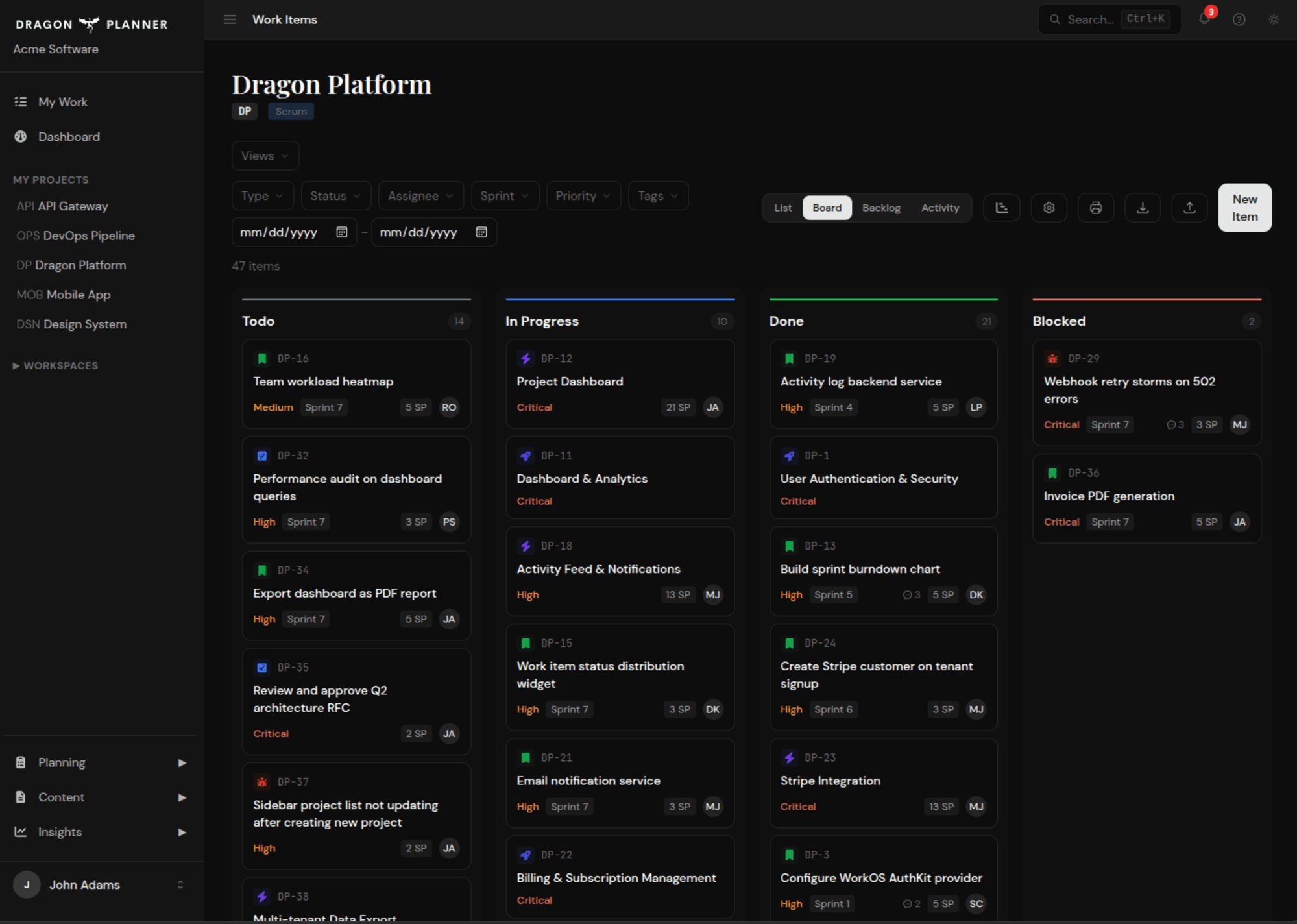
Sprint Boards & Kanban
Drag-and-drop Kanban boards with real-time status columns. Choose Scrum or Kanban per project — no one-size-fits-all methodology forced on your team.
Learn more →Program Increments
SAFe-style PI planning with quarters, sprint cadences, holiday tracking, and sprint goals. Plan at the program level and drill down to individual sprints.
Learn more →Smart Recommendations
The recommendation engine surfaces what to work on next — highest priority items whose dependencies are all resolved. No more stale backlogs or blocked surprises.
Learn more →Jira Bridge
Already using Jira? Generate Jira-compatible payloads, sync reference keys, and bulk-update links. Plan in Dragon Planner, push to Jira when your org requires it.
Learn more →Multi-Level Dashboards
Three levels of insight — tenant overview, workspace breakdown, and project detail. See status distributions, story point totals, completion ratios, and active sprint summaries at a glance.
Learn more →Activity Audit Trail
Every create, update, status change, and deletion is logged — who did it, when, and whether it came from the web app or an AI assistant via MCP. Full project accountability.
Learn more →Team & Permissions
Builder and Collaborator seat types with fine-grained roles. Email invitations with 7-day expiry. Owner, Admin, and Member tiers.
Global Search
Search across work items and projects by title, description, item number, or Jira key. Results scoped to your tenant.
File Attachments
Attach images, PDFs, and SVGs to any work item — up to 20 files each. Upload from the web or directly through MCP.
Seat-Based Billing
Four tiers from Free to Max. Pay only for Builder seats that use AI — Collaborator seats cost less. Managed through secure payment processing.
See it in action
From sprint planning to delivery insights, Dragon Planner gives your team the tools to move fast and stay aligned.
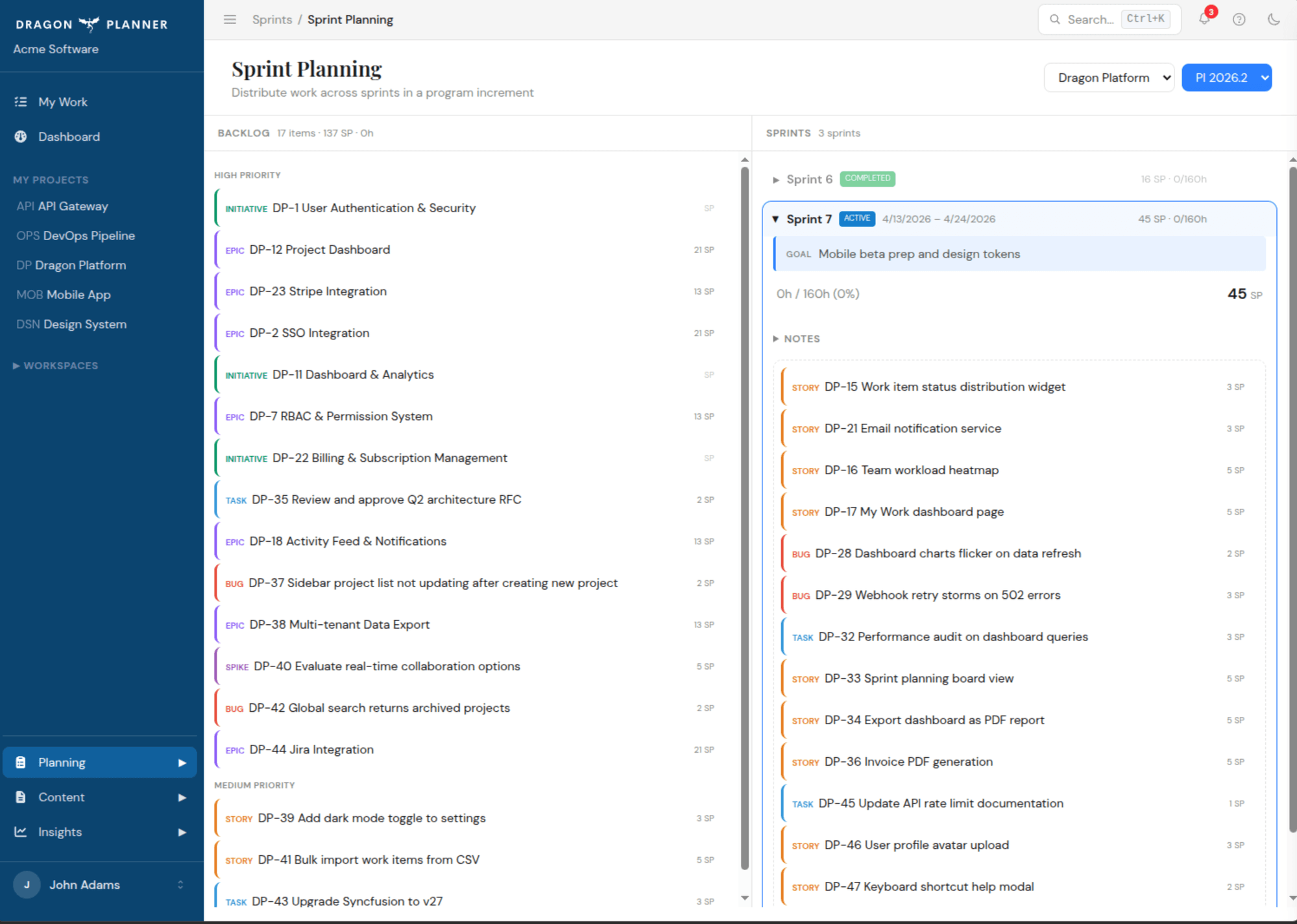
Sprint Planning
Drag items from your backlog into sprints. See story points, capacity, and sprint goals at a glance.
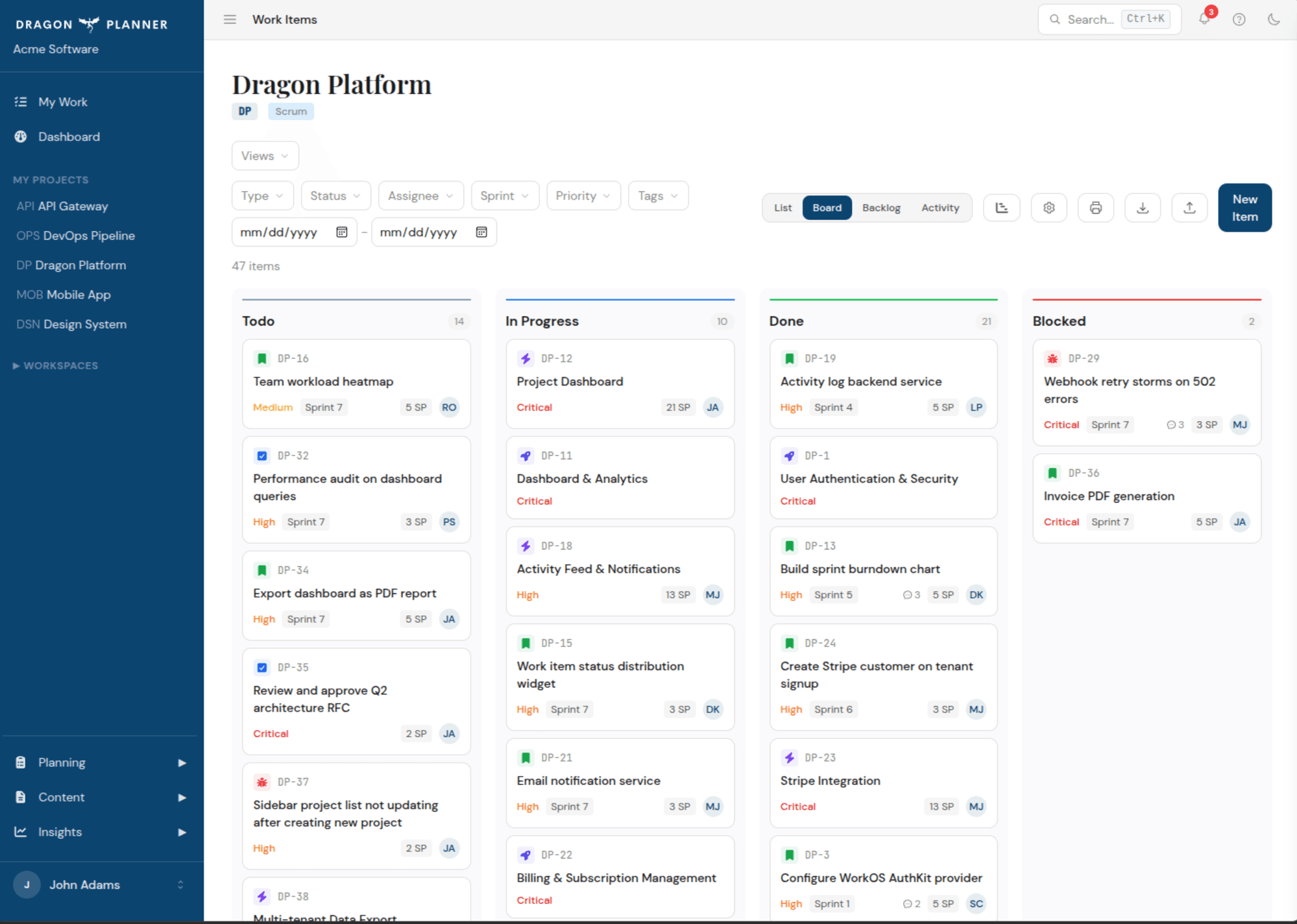
Board View
Visualize work flowing across your team with Kanban boards. Cards show priority, assignee, and story points.
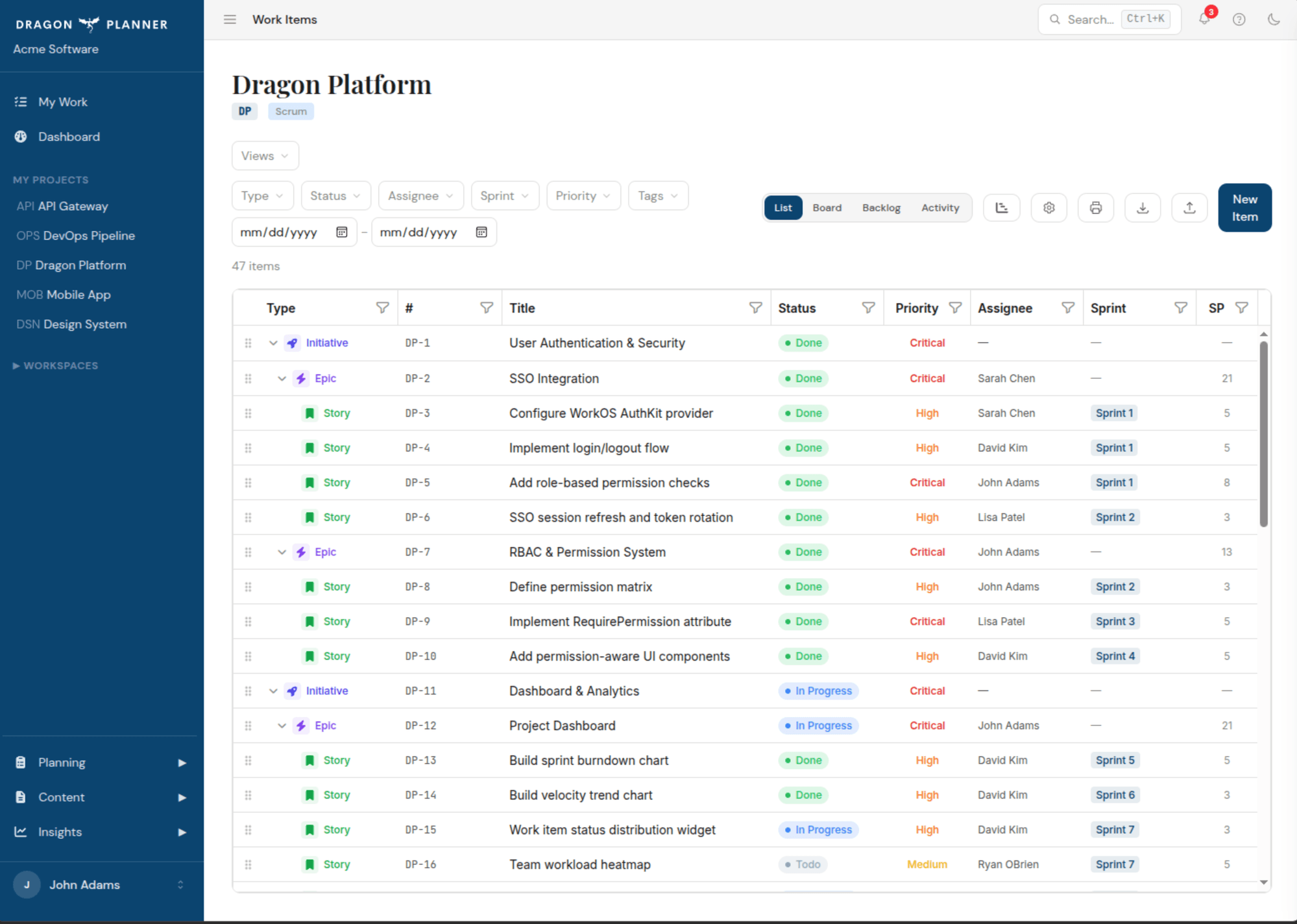
Work Item Hierarchy
See the full picture with a tree grid that nests stories under epics under initiatives. Sort, filter, and drill down.
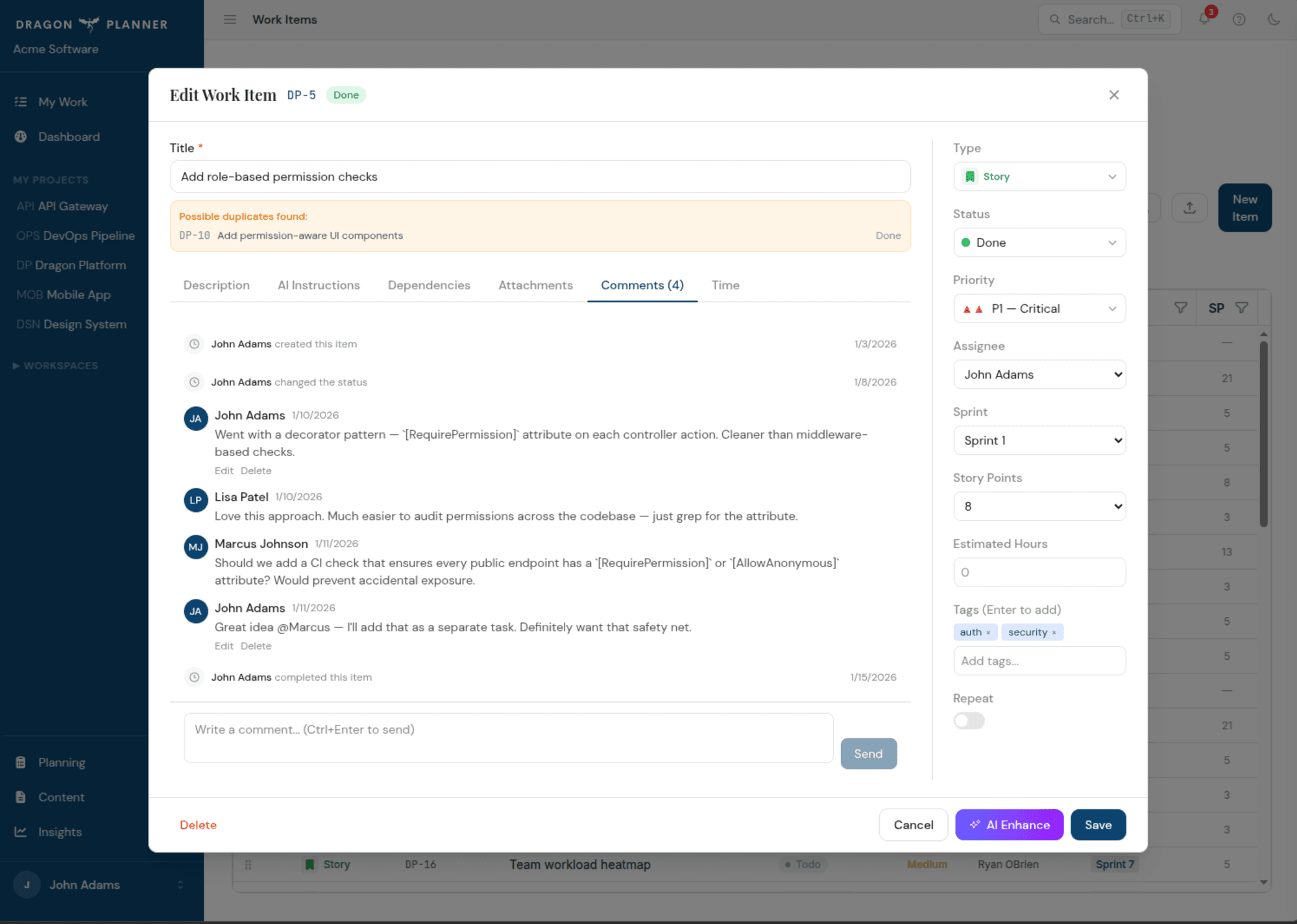
Collaboration
Comment threads, activity timelines, file attachments, and @mentions keep your team in sync.
Insights that drive decisions
Burndown charts, velocity tracking, and audit logs give you the clarity to plan better sprints and ship more predictably.
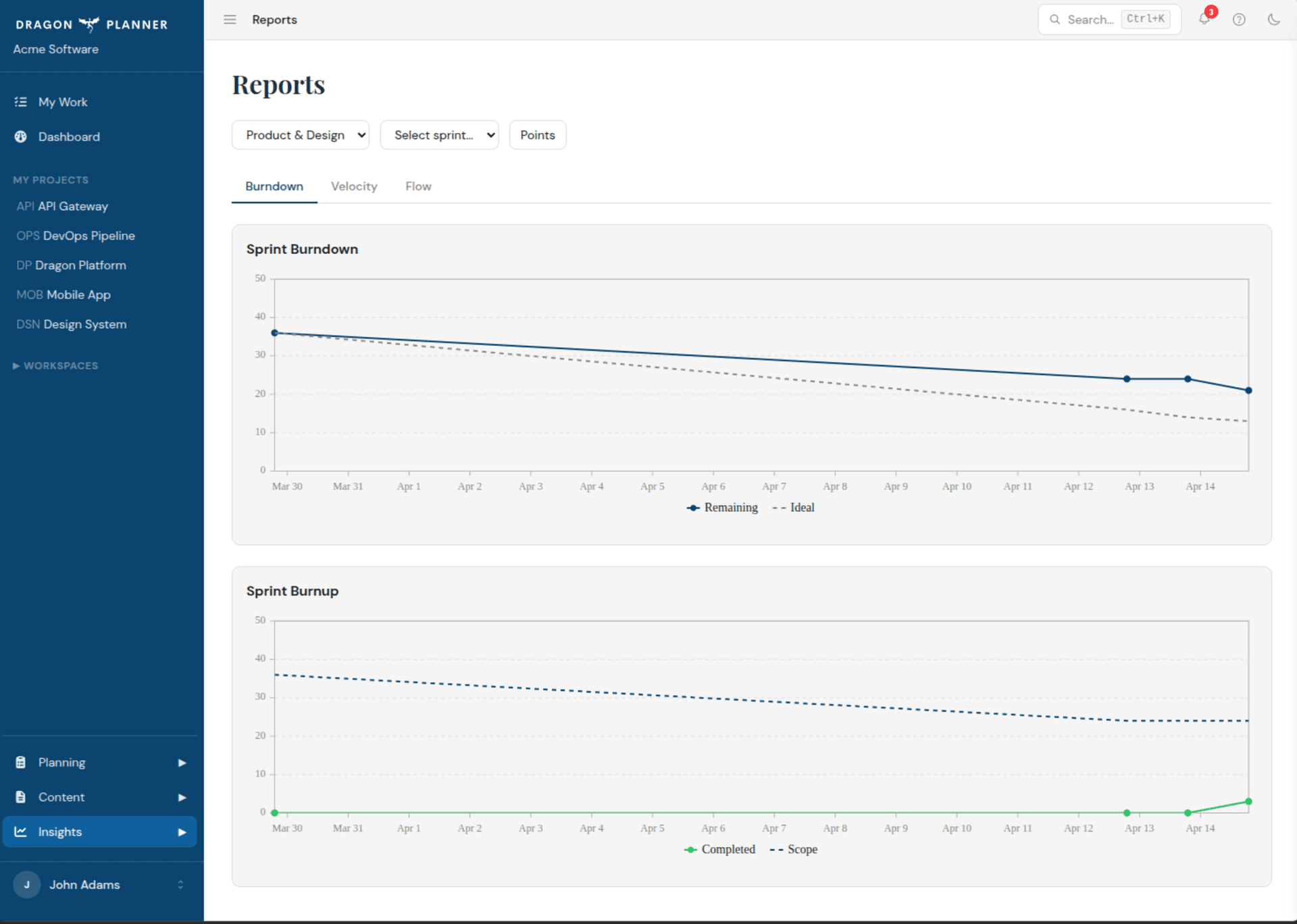
Sprint Burndown
Track remaining work against the ideal burndown line. Burnup charts show completed vs total scope.
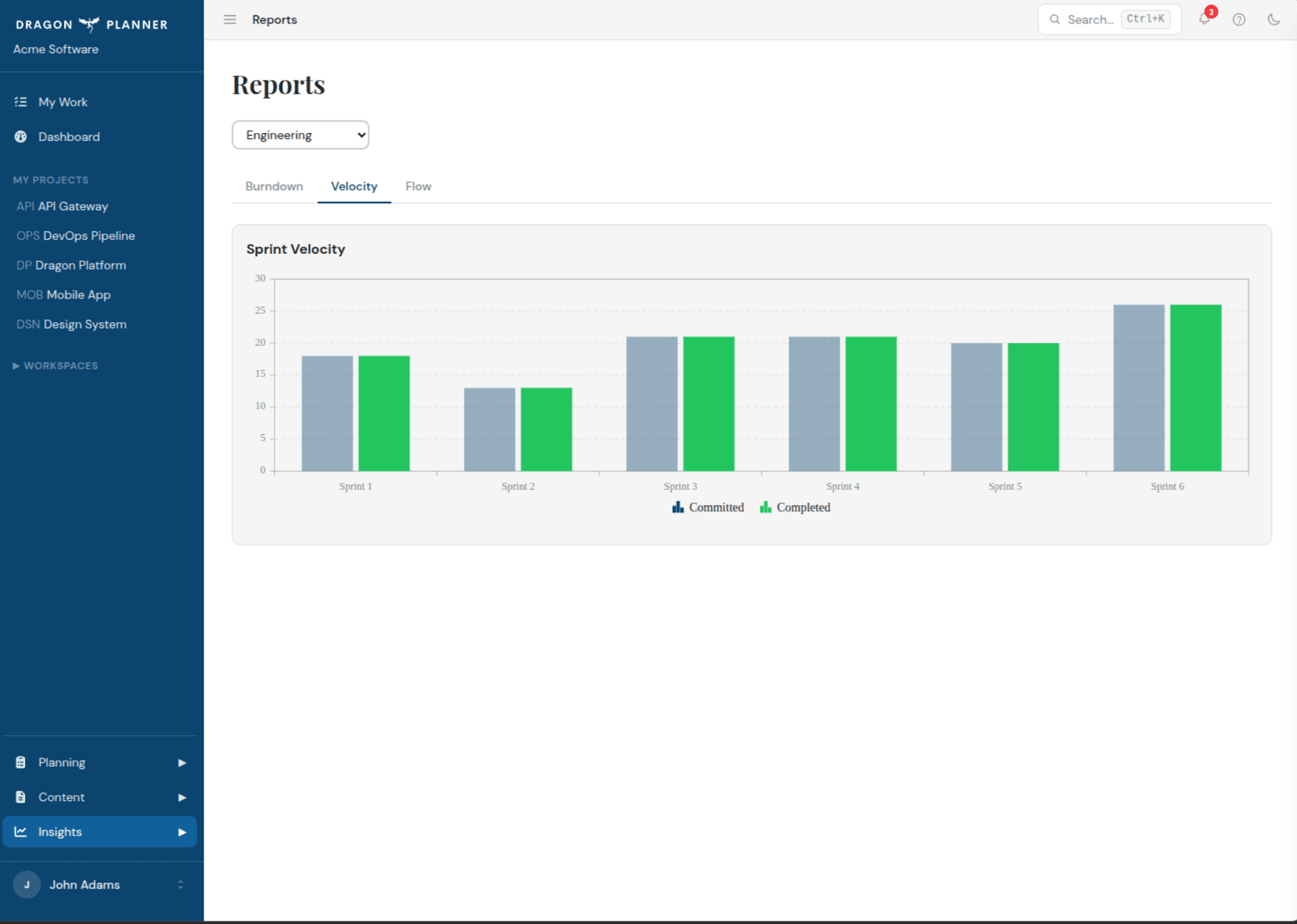
Sprint Velocity
Compare committed vs completed story points across sprints. Spot trends and right-size future sprints.
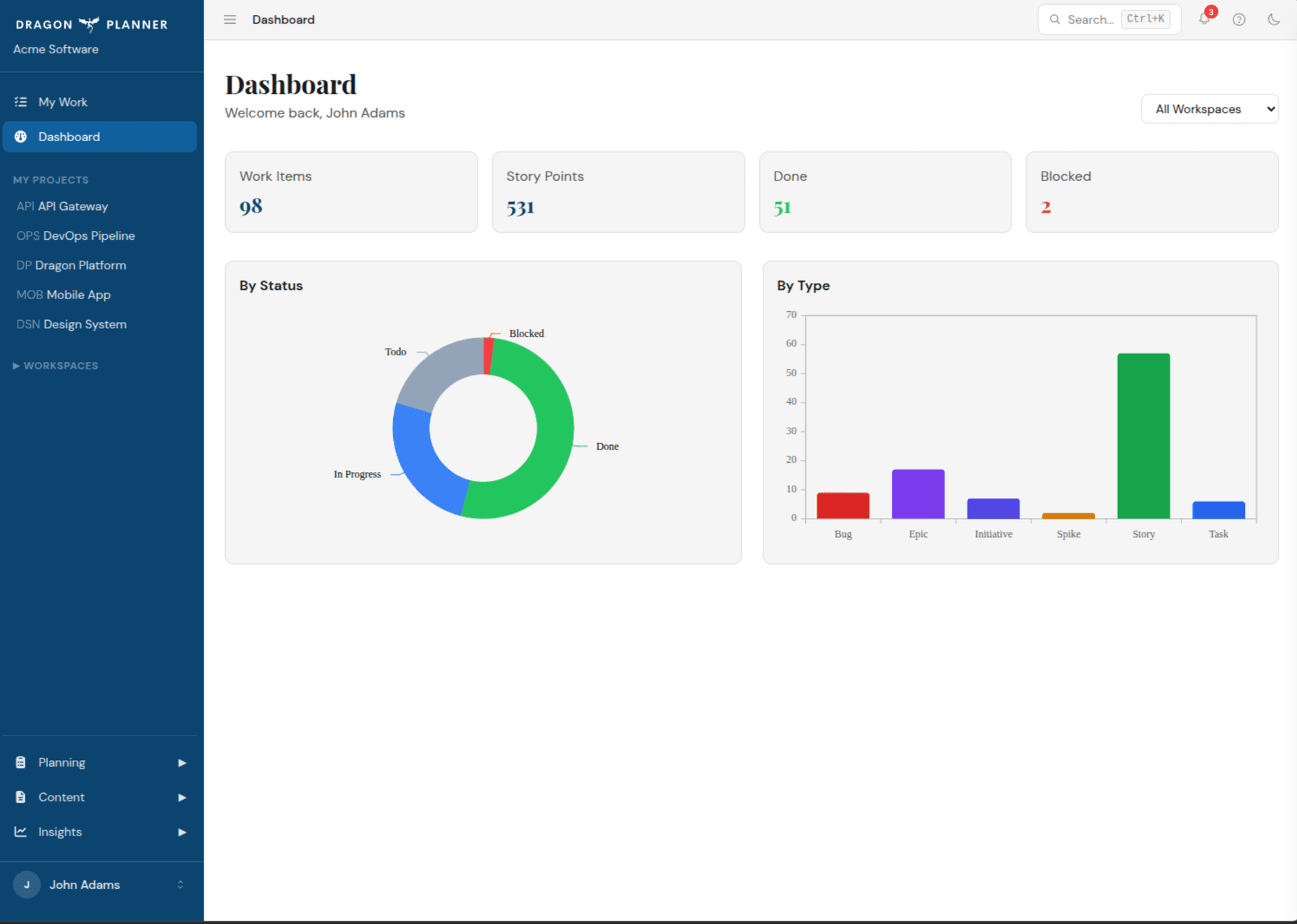
Dashboard
At-a-glance metrics across all workspaces — work items, story points, completion rates, and blockers.
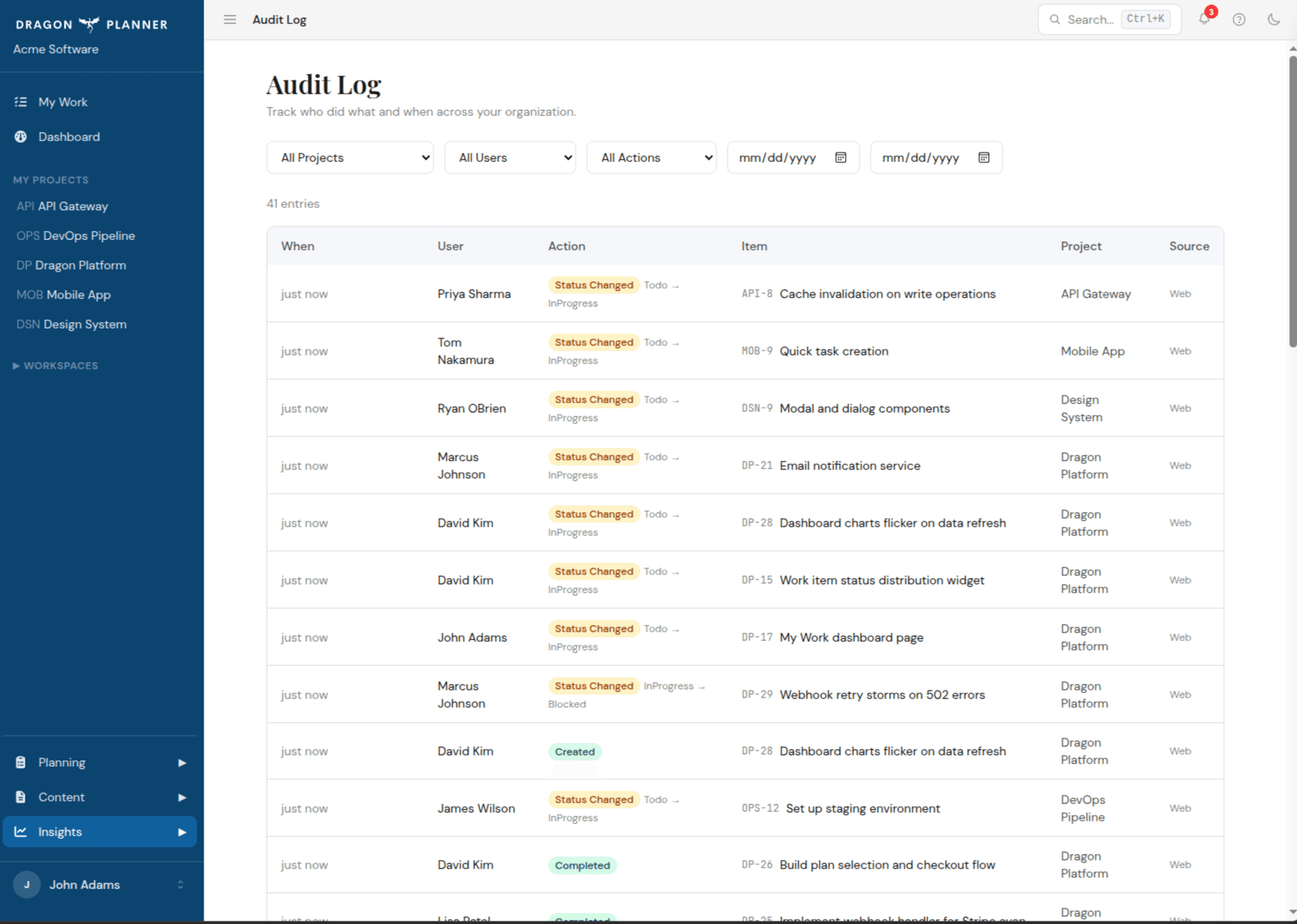
Audit Log
Full accountability — who did what, when, and from where. Filter by project, user, or action type.
Built for AI from day one
Dragon Planner doesn't bolt on AI as an afterthought. Every feature is accessible through the Model Context Protocol — 15 tools across 4 categories, with real auth, real permissions, and a real audit trail.
Full Project Control
Create, update, move, and close work items across a 7-level hierarchy — from initiatives down to subtasks. Mark a parent done and cascade-complete all children. Manage sprints, program increments, and attachments without leaving your terminal.
Smart Recommendations
Ask "what should I work on next?" and get dependency-aware suggestions. The engine surfaces highest-priority items whose blockers are all resolved — no more stale backlogs or blocked surprises.
Jira Bridge
Generate Jira-compatible payloads, sync reference keys, and bulk-update links. Plan in Dragon Planner, push to Jira when your org requires it — without Dragon Planner ever calling Jira directly.
Enterprise-Grade Security
OAuth 2.0 with PKCE authentication. Fine-grained permissions per resource type — read, write, and delete scoped independently. Plan-aware rate limiting, connection caps, and a full audit trail on every action.
you: What should I work on next?
→ get_next_recommendation
Story #247 [P1] "Add bulk import endpoint"
All 3 dependencies resolved. Assigned to you. Sprint 12.
you: Mark it in-progress and create a subtask for the CSV parser.
→ update_work_item #247 → InProgress
→ create_work_item SubTask → parent #247
Done. #247 is now In Progress.
Created SubTask #248 "Implement CSV parser" under #247.
you: Attach the schema diagram from my desktop.
→ upload_attachment #247 schema-diagram.png
Attached schema-diagram.png (42 KB) to #247. 1 of 20 attachment slots used.
From idea to shipped in three steps
No elaborate setup. No week-long onboarding. Just sign in and start planning.
Create your workspace
Sign up and your first workspace, project, and free plan are created automatically. Invite your team with email invitations, assign Builder or Collaborator seats, and start structuring work immediately.
Plan your sprints
Build your backlog with a full work item hierarchy — from initiatives down to subtasks. Set up Program Increments and sprint cadences, or go pure Kanban. The AI recommendation engine tells you what to tackle next based on priority and resolved dependencies.
Ship with AI at your side
Connect Claude or any MCP client to your Dragon Planner server. Query your backlog, create work items, attach files, mark tasks complete, and groom your project — all from the terminal, your IDE, or anywhere MCP runs.
What's coming next
Dragon Planner is actively growing. Here's what we're building.
PM & BA Views
Project Manager and Business Analyst dashboards with role-specific reporting, burndown charts, velocity trends, and portfolio-level visibility.
Claude Desktop Plugin
First-class Cowork integration for Claude Desktop. Manage your backlog, review sprint progress, and plan work without leaving the conversation.
Custom Workflows
Define your own statuses, transitions, and approval gates. Build workflows that match how your team actually ships — not how a tool thinks you should.
Blueprint Creation & Sharing
Create reusable project blueprints from your best setups and share them with the community. Start new projects in seconds with proven structures, sprints, and work item templates.
MCP Channel Automation
Trigger Claude Code workflows directly from the web UI. Push work items, sprint changes, and project events into automated MCP pipelines without touching the terminal.
Mobile App
Native mobile views for iOS and Android. Review sprints, update work items, and check dashboards on the go — optimized for touch, not squeezed from desktop.
Ready to plan like a dragon?
Free to start. No credit card required. Upgrade when your team grows.
Get started free→