Structure That Scales With Your Project
Seven work item types with configurable hierarchy rules — strict or relaxed. Structure work the way your team actually thinks — from high-level initiatives down to individual subtasks.
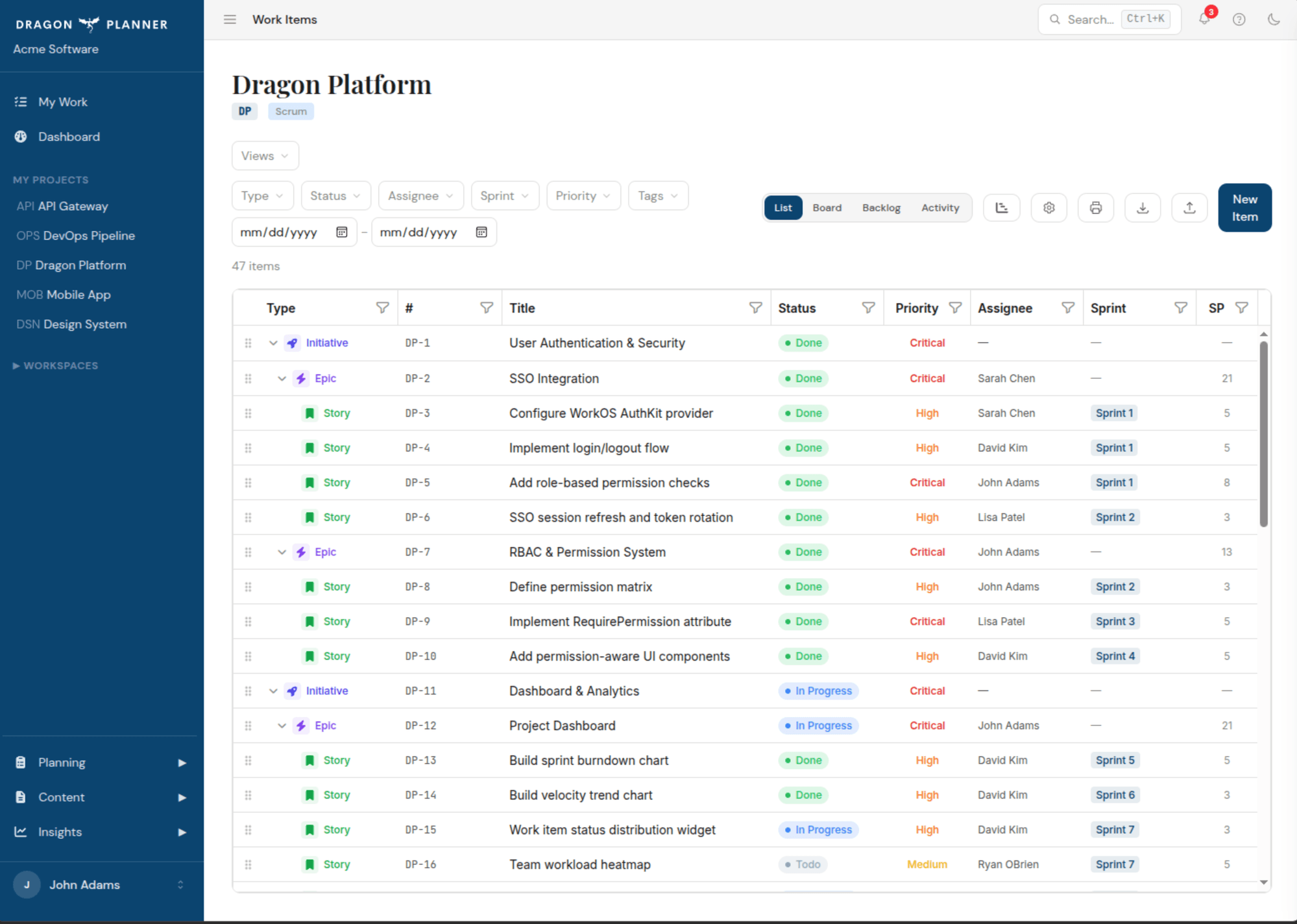
Seven Levels of Work
Model your project at any level of detail. Each work item type has configurable rules about what can be its parent and child — strict for teams that want guardrails, relaxed for teams that need flexibility.
- Initiative — the largest unit of work, spanning quarters or releases
- Epic — a significant deliverable broken into stories
- Story, Bug, Task — the day-to-day units your team works on
- SubTask — fine-grained work under any story, bug, or task
- Spike — time-boxed research or investigation items
strict mode
you: Move the SubTask under the Initiative.
→ move_work_item DP-48 newParent=DP-1
Cannot place SubTask under Initiative.
Valid parents for SubTask: Story, Bug, Task
relaxed mode
you: Move the SubTask under the Initiative.
→ move_work_item DP-48 newParent=DP-1
Moved DP-48 under DP-1 "Platform Launch".
Strict or Relaxed — Your Call
Choose how tightly Dragon Planner enforces hierarchy rules. Strict mode keeps your tree clean with traditional parent-child constraints. Relaxed mode lets you nest items more freely when your workflow doesn't fit a rigid structure.
- Strict mode — Initiative → Epic → Story/Bug/Task → SubTask, enforced at every level
- Relaxed mode — flexible nesting so most types can parent most others
- Toggle per organization in settings — no migration needed
- Cascade complete — mark a parent done and all children close with it
- Move items between parents without losing history
you: What's ready to work on next?
→ get_next_recommendation
Top items — all dependencies resolved:
✓ DP-38 "Multi-tenant Data Export" 13 SP
✓ DP-40 "Evaluate real-time collaboration" 5 SP
3 items skipped — blocked by:
• DP-44 blocked by DP-38 (Blocks)
• DP-50 blocked by DP-49 (Blocks)
Dependencies That Prevent Surprises
Link work items together with typed dependency relationships. The system knows which items are blocked and surfaces that information everywhere — dashboards, recommendations, and AI queries.
- Blocks — item A must complete before item B can start
- Relates To — items are connected but not blocking each other
- Duplicate — mark items as duplicates to avoid double-work
- Dependency graph informs the recommendation engine
Story Points
Fibonacci-based story point estimation. Track velocity, forecast capacity, and measure team throughput over time.
Priority Levels
Five priority levels from critical to low. Priority feeds into recommendations so the most important work surfaces first.
Tags & Item Numbering
Project-prefixed item numbers (e.g., PROJ-42) for easy reference. Plus freeform tags for any categorization your team needs.
Assignment & Sprint Linking
Assign items to team members and link them to sprints. Track who owns what and when it needs to ship.
Estimated Hours
Track estimated hours alongside story points for teams that need time-based planning and capacity management.
File Attachments
Attach images, documents, and diagrams to any work item — up to 20 files each. Upload from the web or via AI assistant.
Explore more features
AI Planning
Connect any MCP-compatible AI assistant directly to your project data with 15 tools across 4 categories.
Dashboards
Three levels of dashboards — organization, workspace, and project — so you always know where things stand.
Sprints
Program increments, sprint lifecycles, boards, and a recommendation engine that surfaces what to ship next.
Collaboration
Comments, real-time notifications, role-based access, and file attachments — everything your team needs to stay in sync.
Ready to plan like a dragon?
Free to start. No credit card required. Upgrade when your team grows.
Get started free→